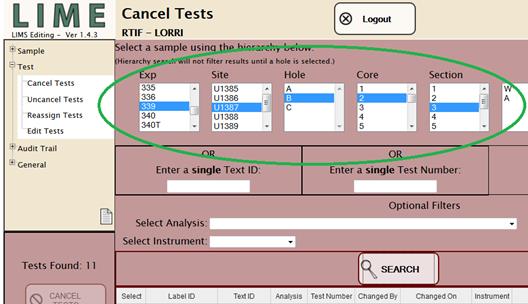
The hierarchy search allows the user to progress through the sample parentage tree (expedition, site, hole, core, section, section half, etc.) to focus the search to the desired level. Note, to run the hierarchy search, at least the hole level must be selected. For example, to find all samples taken from a given section, click on the desired expedition to display all of that expedition’s sites; click a site to show all of that site’s holes; click a hole to show all of that hole’s cores; and so on, down to the section, as shown in the Figure 19 (large circled region).
Figure 19. Hierarchy Search Selection (Test Modules).
In this example, Section 339-U1387B-2H-3 has been selected. The next box after Section lists samples descended directly from the whole-round section, which in this case is the working and archive section halves. The scroll bar on the right side of the box indicates that at least one additional sample exists above or below those shown. Clicking the “SEARCH” button executes a database search for all tests on samples at the selected level and includes all of that sample’s child samples, all of the children’s child samples (i.e., “grandchild samples”), and so on, down to the lowest level sample in the tree.
When the search query is complete, the samples are returned on a results table with select checkboxes unchecked. There is no expand or collapse option or tree view.
Each test module’s behavior from this point on is different and is covered in detail in the appropriate sections below. In general, however, once the search results are returned, the user selects one or more samples by checking the selection boxes and then performs the function (Cancel, Uncancel, Reassign, or Edit) by clicking the function button in the lower left panel.
|
· |
The hierarchy search will not function unless at least the Hole level has been selected. |
|
· |
Too narrow a search (e.g., past section half) may return no samples. |
|
· |
Too wide a set of search parameters can return too many samples and create very slow program response! In addition, function behavior may be unstable if more than 2000 rows are returned. |
|
· |
Displayed search results are limited by the privileges of the user’s account role for each test module. |
|
· |
Hierarchy searches are not compatible with TEXT_ID and TEST_NUMBER searches. |
|
· |
Selecting any part of a hierarchy clears the TEXT_ID and TEST_NUMBER fields. |
|
· |
Entering anything in the TEXT_ID field clears the hierarchy and the TEST_NUMBER fields. |
|
· |
Entering anything in the TEST_NUMBER field clears the hierarchy and the TEXT_ID fields. |
|
· |
Optional filters are compatible with all three types of searches, and selections in the Analysis and Instrument fields are not cleared. |