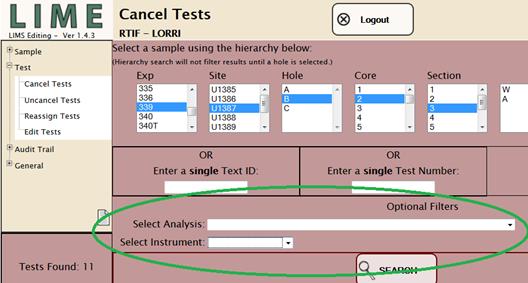
Two search parameters (optional filters) are defined to assist the user in narrowing the search results to a manageable set. The Analysis and Instrument parameters can be used independently or in tandem, and are compatible with hierarchy, TEXT_ID, and TEST_NUMBER searches.
The Analysis selector is a drop-down value list showing the LIMS database code for each analysis (e.g., ALKALINITY) and a text description of each analysis (e.g., Alkalinity by autotitration).
The Instrument selector is a drop-down value list showing the name of the instrument used to acquire the data. Note that this is the name of the system (e.g., Whole-Round MultiSensor Logger [WRMSL]), not the sensor (e.g., Magnetic Susceptibility meter [MS]).
Each selector is a single-select pick list; only one of each type may be selected.
Figure 20. Analysis and Instrument Parameter Search Selectors.
|
· |
In Test module searches, the user cannot use parameters searches independent from the hierarchy, TEXT_ID, or TEST_NUMBER searches. Parameter search must be combined with one of these types of searches. |
|
· |
Too narrow a set of search parameters can return no samples! |
|
· |
Too wide a set of search parameters can return too many samples and create very slow program response! In addition, the behavior of each function may be unstable if more than 2000 rows are returned. |
|
· |
Hierarchy searches are not compatible with TEXT_ID and TEST_NUMBER searches. |
|
· |
Selecting any part of a hierarchy clears the TEXT_ID and TEST_NUMBER fields. |
|
· |
Entering anything in the TEXT_ID field clears the hierarchy and the TEST_NUMBER fields. |
|
· |
Entering anything in the TEST_NUMBER field clears the hierarchy and the TEXT_ID fields. |
|
· |
Parameters are compatible with all three types of searches, and selections in the Analysis and Instrument fields are not cleared. |